Puis-je utiliser le fichier depuis une cle USB ?
Oui. Le WZIP peut se trouver sur une cle USB : branchez-la, ouvrez le navigateur, chargez le fichier et continuez avec votre workspace.
Docs
Un guide pratique pour utiliser l'application portable de facturation et de reporting : donnees locales dans le navigateur, exports ZIP securises et bonnes pratiques operationnelles.
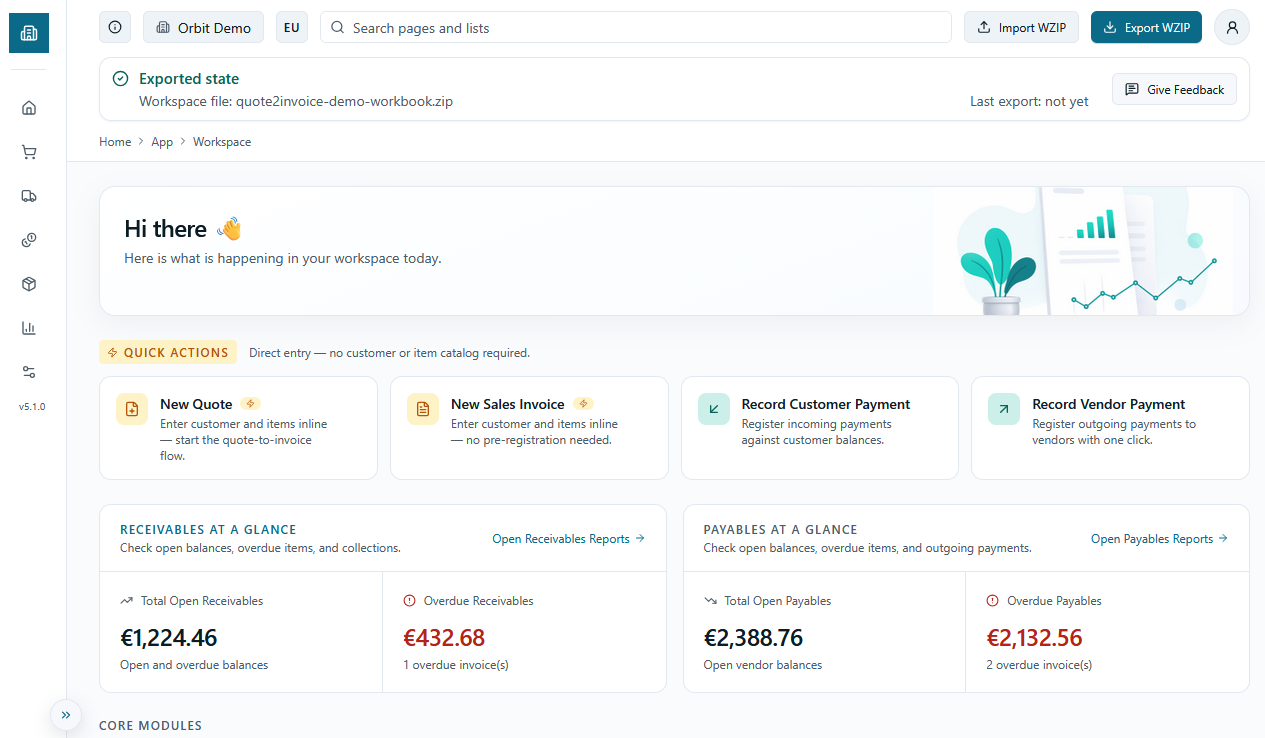
Un workspace portable pour les devis, la facturation et le reporting, destine aux petits commercants et aux petites entreprises qui veulent une visibilite claire sans adopter un ERP complet.
Cette application est concue pour les personnes qui travaillent actuellement avec des fichiers, des tableurs et des processus manuels, et qui ont besoin d'un moyen plus simple de gerer clients, articles, devis, factures, paiements et reporting. Elle fonctionne dans le navigateur, conserve les donnees en local et vous permet d'emporter votre workspace sous forme de fichier ZIP portable.
Le nom Quote2Invoice reflete le flux principal : du devis a la facturation, avec suivi des soldes ouverts et en retard.
L'objectif n'est pas de reproduire un ERP d'entreprise complet. L'objectif est de donner aux petites structures un outil de travail pratique : creer des factures, suivre ce qui est encore ouvert ou en retard, reprendre le travail n'importe ou, garder le controle local des donnees et eviter la complexite des serveurs et des bases de donnees.
Le reporting structure est la ou le workspace apporte le plus de valeur. Des rapports tels que les factures ouvertes, les factures en retard et l'aging sont beaucoup plus faciles a maintenir coherents dans le temps au sein d'un seul workflow.
Concu pour
Petits commercants, petites entreprises et equipes sans ERP.
Fonctions principales
Devis, facturation, paiements et reporting creances fiable.
Par conception
Portable, local-first, base sur des fichiers, et non un ERP complet.
Tout commence par une seule etape : ouvrir votre workspace.
Pour acceder a Quote2Invoice, ouvrez l'application et connectez-vous avec votre compte Google. L'etape de connexion est obligatoire — c'est la porte qui vous permet d'entrer dans le workspace. A ce stade, Google est utilise uniquement pour vous identifier entre les sessions : aucune donnee de facturation n'est transmise a un serveur, aucun document ne quitte votre appareil et aucun stockage cloud n'est implique. Vos donnees vivent entierement dans le stockage local de votre navigateur et ne se deplacent que lorsque vous exportez explicitement votre fichier WZIP.
La raison pour laquelle une connexion est requise meme pour un outil local-first est la compatibilite future : les fonctionnalites premium a venir — notamment la sauvegarde cloud automatique, la synchronisation entre appareils et la collaboration en equipe — seront liees a votre compte. Se connecter maintenant signifie que votre identite de workspace est deja en place lorsque ces fonctionnalites deviendront disponibles.
Une fois connecte, l'application propose trois chemins d'entree. Si vous demarrez de zero, choisissez Ouvrir un workspace vierge : vous obtenez un workspace local vide, pret pour vos vrais clients, articles et documents, sans donnees d'exemple ni bruit. Si vous souhaitez explorer le produit en premier, choisissez Entrer en demo : un jeu de donnees pre-rempli avec clients, articles, devis et factures se charge instantanement, vous permettant de naviguer dans chaque fonctionnalite sans vous engager avec des donnees reelles. Si vous revenez d'une session precedente, choisissez Importer un WZIP : cela reouvre votre fichier workspace portable sauvegarde, exactement la ou vous vous etiez arrete.
Une fois le chemin d'entree resolu, vous arrivez sur le Tableau de bord. C'est le hub operationnel de l'application : il affiche les factures ouvertes, les creances en retard, les meilleurs clients et vous donne un acces direct a chaque type de document. De la, vous pouvez naviguer vers Ventes, Achats, Inventaire et Rapports a tout moment.
La configuration est le panneau de controle de votre workspace de facturation. Elle doit etre remplie avec soin avant d'emettre votre premier document.
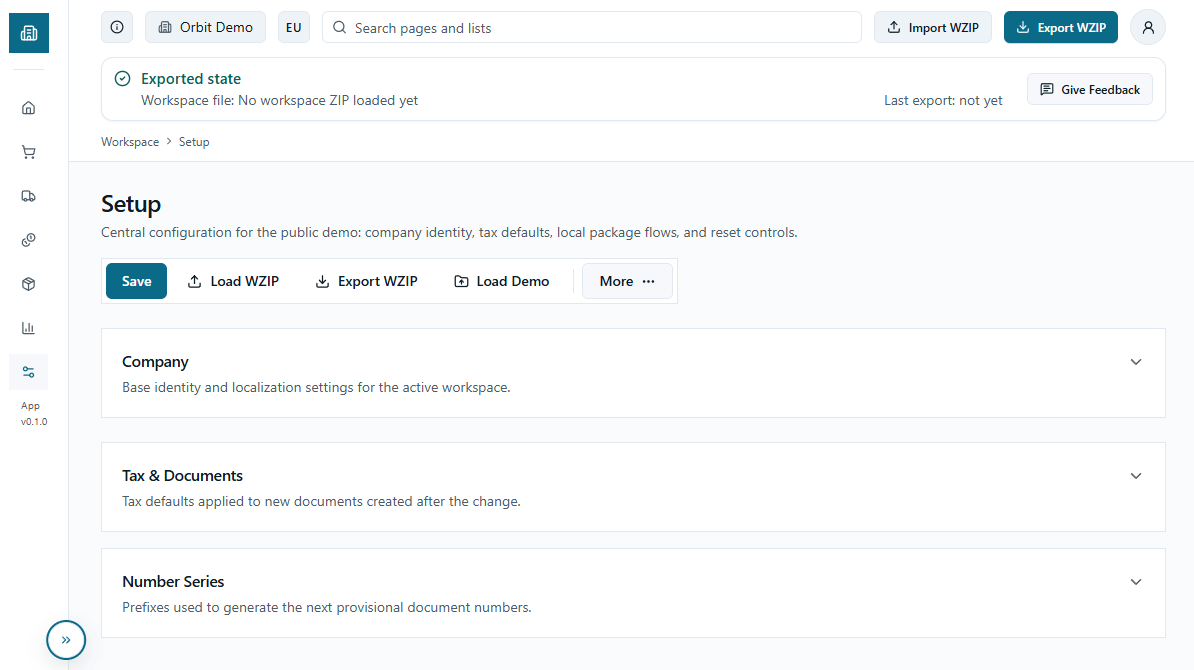
Completez la configuration avant de creer tout document. Les donnees saisies ici apparaissent sur chaque impression PDF.
La configuration du workspace est le parametre central dont dependent tous les processus de l'application. Ce n'est pas un ecran facultatif : chaque impression PDF, chaque facture emise et chaque document genere puise ses donnees directement dans ce que vous saisissez ici. Une configuration incomplete ou approximative se traduit par des documents fiscaux avec des donnees incorrectes, des en-tetes manquants ou une numerotation incoherente — des erreurs qui se propagent silencieusement dans tout le workspace.
La premiere section, Donnees de l'entreprise, regroupe les informations qui apparaissent sur chaque document imprime : raison sociale, adresse complete, code postal, ville, pays, telephone, email et site web. Vous pouvez egalement telecharger votre logo d'entreprise au format PNG, JPG ou WebP — il est integre directement dans le PDF de chaque facture et devis. Le champ Numero de TVA ou d'identification fiscale est celui qui figure dans l'en-tete legal de vos documents, il doit donc etre saisi exactement comme requis par la reglementation de votre pays. Les champs Localisation (EU ou USA) et Devise (EUR ou USD) determinent le format des nombres, des separateurs decimaux et du symbole monetaire dans tout le workspace.
La deuxieme section, Fiscalite et documents, controle la facon dont les taxes sont calculees. Configurez le regime fiscal sur EU_VAT pour les entites europeennes, ou sur US_SALES_TAX pour le marche americain. Le mode de calcul determine si les prix saisis sur les articles incluent deja la taxe (TAX_INCLUSIVE) ou sont hors taxe (TAX_EXCLUSIVE) — ce parametre se repercute directement sur les totaux de chaque document. Le taux de TVA par defaut est celui automatiquement propose lors de la creation d'un nouvel article ou document : choisissez celui que vous utilisez le plus souvent pour accelerer la saisie.
La troisieme section, Serie de numerotation, definit les prefixes et les compteurs pour chaque type de document : devis de vente, commandes de vente, factures provisoires, factures comptabilisees, paiements clients et factures d'achat. Chaque prefixe fait partie du numero de document — par exemple 'FAC-' genere des factures comme FAC-0001, FAC-0002, etc. L'application affiche un apercu du prochain numero qui sera attribue, vous permettant de verifier que la serie est correcte avant de sauvegarder. Modifier le prefixe apres avoir deja emis des documents ne modifie pas les numeros existants, mais peut creer des lacunes dans la serie — mieux vaut le definir correctement des le depart.
Une fois la configuration terminee, sauvegardez avec le bouton Tout sauvegarder en haut a droite. Les modifications prennent effet immediatement et s'appliquent a tous les documents crees a partir de ce moment. N'oubliez pas que les donnees de configuration font partie du fichier WZIP : si vous exportez votre workspace apres la configuration, tout est inclus dans le fichier portable et se recharge intact a la prochaine ouverture.
Les donnees de base sont le fondement sur lequel repose chaque document du workspace. Les clients, articles et fournisseurs doivent etre configures avant de creer des devis ou des factures.
Le registre clients se trouve sous Ventes > Clients. Pour chaque client, vous pouvez enregistrer son nom, sa ville, son code departement, son code pays, son telephone, son email et son numero de TVA — ces donnees sont automatiquement reprises dans l'en-tete de chaque devis, commande et facture emise pour ce client. Le champ Conditions de paiement (NET15, NET30, NET45, DUEONRECEIPT) definit l'echeance par defaut des documents de ce client et alimente directement les rapports d'aging et de factures en retard. Le champ Bloque permet de desactiver un client sans le supprimer : les documents existants restent intacts, mais le client ne peut plus etre selectionne sur de nouveaux documents.
Le registre articles se trouve sous Inventaire > Articles. Chaque article possede un numero identifiant, une description, un code categorie, une unite de mesure de base, un prix de vente unitaire et un cout unitaire. Le prix unitaire est automatiquement propose lorsque vous ajoutez l'article a un devis ou a une facture — vous pouvez toujours le remplacer sur le document, mais partir d'un tarif correct dans les donnees de base evite des erreurs repetees. La quantite en stock est un champ informatif qui vous permet de suivre les stocks sans gerer un entrepot complet. Les articles disposent egalement d'un champ Bloque pour les exclure de la selection sans avoir a les supprimer.
Le registre fournisseurs se trouve sous Achats > Fournisseurs et utilise les memes champs que les clients : numero, nom, coordonnees, numero de TVA et conditions de paiement. Les fournisseurs alimentent le flux d'achat allege de l'application — factures d'achat provisoires et gestion des couts associes. Si vous n'avez pas de flux d'achat actif, cette section est facultative et peut etre remplie ulterieurement.
Des donnees de base soignees font une difference concrete sur la qualite des documents emis. Chaque champ rempli avec precision — en particulier la raison sociale, le numero de TVA et les conditions de paiement — se repercute directement sur les en-tetes, les echeances et les rapports. Il est conseille de creer au moins vos principaux clients et articles avant d'emettre votre premier document reel.
Quote2Invoice couvre l'integralite du cycle de vente en un flux lineaire : devis, commande, facture provisoire, facture comptabilisee et paiement. Chaque document s'appuie sur le precedent et reporte automatiquement les donnees deja saisies.
Le point d'entree du cycle de vente est le Devis de vente, accessible sous Ventes > Devis. Chaque devis necessite un client, une date de document, une date d'echeance et au moins une ligne. Les lignes comprennent un article (selectionnable depuis le registre articles), une description, une quantite, un prix unitaire, une remise en pourcentage par ligne et un taux de TVA. Les totaux sont calcules automatiquement en net, TVA et TTC. Le champ Remise facture % applique une remise au niveau du document avant le calcul final. Les notes sont facultatives mais utiles pour la communication client. Le devis reste modifiable jusqu'a sa conversion.
La Commande de vente fonctionne exactement comme le devis — memes champs, meme structure de lignes — mais inclut un champ supplementaire Numero de devis source qui se remplit automatiquement lorsque vous creez une commande a partir d'un devis existant. Cette tracabilite relie chaque commande a son offre commerciale sans perdre l'historique du document. Les commandes peuvent egalement etre creees de toutes pieces sans passer par un devis.
La Facture provisoire de vente est le document de travail avant l'enregistrement comptable definitif. Par rapport aux devis et commandes, elle ajoute le calcul automatique de la date d'echeance en fonction des conditions de paiement du client — si vous definissez NET30 et que la date du document est aujourd'hui, la date d'echeance se met a jour automatiquement. Lors de l'ajout de lignes, le bouton Ajouter une ligne similaire copie automatiquement l'article, la description, le prix unitaire et le taux de TVA de la derniere ligne saisie, accelerant la saisie pour les documents avec des articles repetes. La facture provisoire est encore modifiable : c'est le bon moment pour verifier les montants, les remises et les donnees avant de continuer.
La Facture comptabilisee est immuable : une fois comptabilisee, aucun champ ne peut etre modifie. Elle affiche toutes les donnees de la facture provisoire source, la date de comptabilisation, le numero de facture definitif et le statut de la creance — Ouverte, En retard ou Cloturee — mis a jour automatiquement en fonction des paiements recus. Depuis le detail de la facture comptabilisee, vous pouvez directement enregistrer un paiement ou ouvrir l'apercu PDF pour impression ou envoi. La section registre comptable affiche le montant initial, le montant paye et le solde restant en temps reel.
Les Paiements clients s'enregistrent sous Ventes > Paiements clients ou directement depuis la facture comptabilisee. Le flux necessite de selectionner la facture a regler — le client, le montant restant et la date d'echeance sont alors remplis automatiquement. Vous pouvez ajuster le montant pour enregistrer des paiements partiels. Chaque paiement met immediatement a jour le statut de la facture et alimente les rapports de factures ouvertes et en retard. Pour le cycle achat, les Factures d'achat suivent la meme logique mais avec des fournisseurs et un cout unitaire au lieu du prix unitaire, avec une variante de saisie rapide permettant d'enregistrer un fournisseur meme s'il n'existe pas dans le registre.
La Facture rapide est un raccourci pour emettre une facture en un seul ecran, sans passer par les etapes de devis, commande et facture provisoire. Elle est concue pour les situations ou la rapidite prime sur la tracabilite documentaire.
La Facture rapide se trouve sous Ventes > Factures rapides. Elle cree un document autonome en une seule etape : saisissez le nom du client (ou selectionnez-le depuis le registre), ajoutez des lignes avec description, quantite, prix unitaire et taux de TVA, et le document est enregistre immediatement. Contrairement au flux de vente complet, aucun document preliminaire n'est requis — vous passez d'un ecran vide a une facture numerotee en une seule action.
Chaque facture rapide recoit un identifiant avec prefixe numerote (FSI- par defaut, configurable dans la Configuration). Le document contient la meme structure de lignes qu'une facture standard — description, quantite, prix unitaire, remise par ligne, taux de TVA et totaux calcules — mais existe en tant qu'enregistrement independant, pas comme une etape dans la chaine devis-paiement.
Lorsque vous etes pret a integrer une facture rapide dans le flux comptable officiel, vous pouvez la convertir en facture provisoire — ou en devis si vous preferez recommencer depuis le debut du flux standard. La conversion transfere toutes les lignes. Si des lignes font reference a des codes article qui n'existent pas encore dans le registre, l'application vous demande de confirmer leur creation avant de convertir.
La Facture rapide est le bon outil lorsque : un client appelle et a besoin d'une facture immediatement ; vous emettez des frais ponctuels qui ne necessitent pas de tracabilite vers un devis ; ou vous preferez travailler d'abord et formaliser la piste documentaire ensuite. Ce n'est pas un substitut au flux complet lorsque vous avez besoin d'une piste d'audit complete de l'offre commerciale au paiement.
Le flux achats est le cycle passif symetrique au cycle actif : devis achat, commande achat, facture provisoire, facture comptabilisee et paiement fournisseur. Il donne une visibilite symetrique sur ce que vous devez aux fournisseurs par rapport a ce que les clients vous doivent.
Le cycle achats commence par le Devis achat, accessible sous Achats > Devis. Comme son equivalent du cycle actif, il necessite un fournisseur, une date de document, une date d'echeance et au moins une ligne. Les lignes utilisent le cout unitaire plutot que le prix unitaire — meme structure avec description, quantite, remise et taux de TVA, mais orientee vers ce que vous payez plutot que ce que vous facturez. Les devis achat sont optionnels : vous pouvez demarrer depuis une commande ou passer directement a la facture provisoire si aucun devis formel du fournisseur n'existe.
La Commande achat, sous Achats > Commandes, suit la meme structure que le devis et inclut un champ Numero devis origine qui se remplit automatiquement lorsque la commande est creee depuis un devis existant. Comme la commande vente, elle peut aussi etre creee directement sans devis prealable. La commande represente l'engagement formel envers le fournisseur avant l'arrivee de la facture.
La Facture provisoire achat est le document de travail ou vous enregistrez les details de la facture fournisseur avant de les valider dans le registre. Elle fonctionne comme la facture provisoire vente — montants, couts, remises et notes sont encore modifiables — et calcule automatiquement la date d'echeance depuis les conditions de paiement du fournisseur. Une fois verifiee, la comptabilisation la rend immuable et cree l'ecriture de dette dans le registre.
La Facture comptabilisee achat est le document definitif. Elle affiche fournisseur, date de comptabilisation, numero de facture, totaux et le statut de la dette — Ouverte, En retard ou Cloturee — mis a jour automatiquement au fur et a mesure des paiements enregistres. Comme les factures vente comptabilisees, elle ne peut pas etre modifiee apres comptabilisation. Depuis le detail vous pouvez enregistrer un paiement directement ou ouvrir le PDF pour archivage.
Les Paiements fournisseurs s'enregistrent sous Achats > Paiements fournisseurs ou directement depuis la facture comptabilisee. Le flux selectionne la facture a regler, remplit automatiquement fournisseur, montant restant et echeance, et prend en charge les paiements partiels. Chaque paiement met immediatement a jour le statut de la facture et alimente les rapports passifs — Factures fournisseurs ouvertes, Factures fournisseurs en retard et Aging par fournisseur. Pour la saisie rapide — quand une facture fournisseur arrive sans commande formelle — utilisez la Facture rapide achat sous Achats > Factures rapides. Elle fonctionne comme la Facture rapide du cycle actif : un seul ecran sans etapes preliminaires. Contrairement a la variante vente, elle requiert un numero fournisseur plutot qu'un nom libre, car l'identification du fournisseur est necessaire pour lier correctement la dette au registre.
Les rapports de Quote2Invoice constituent le tableau de bord financier de votre workspace. Ils affichent en temps reel l'etat des creances, des dettes et du chiffre d'affaires — construits directement a partir des donnees du workspace sans exportations manuelles. Ils sont mis a jour et ameliores au fil du temps pour ajouter de nouvelles vues et affiner celles existantes.
Le Hub Rapports est le point d'acces central. A l'ouverture, il affiche huit KPI immediats divises en deux zones : creances (total ouvert, en retard, clients avec soldes ouverts, encaisse ce mois-ci) et dettes (total ouvert envers les fournisseurs, en retard, fournisseurs avec soldes ouverts, paye ce mois-ci). Sous les KPI, les cartes des rapports individuels affichent le nombre d'entrees actives pour chaque zone, vous permettant de voir en un coup d'oeil ou concentrer votre attention sans rien ouvrir.
Les rapports de creances couvrent quatre angles distincts. Le rapport Factures ouvertes liste toutes les factures comptabilisees avec un solde restant positif : chaque ligne affiche le numero de facture, le client, la date de comptabilisation, la date d'echeance, le montant initial, le montant paye, le montant restant, le statut (Ouverte ou En retard) et les jours de retard. Vous pouvez filtrer par client, plage de dates d'echeance et statut, trier par echeance, montant restant ou client, et paginer a 10, 20 ou 50 lignes. Le rapport Factures en retard est la version filtree en lecture seule avec le meme contenu, le statut etant bloque sur En retard — concu pour un suivi rapide des creances en souffrance sans avoir a configurer des filtres a chaque fois.
Le rapport Aging par client distribue le total ouvert de chaque client en tranches temporelles : Courant (pas encore echu), 1-30 jours, 31-60 jours, 61-90 jours et plus de 90 jours. Chaque ligne indique egalement le nombre de factures ouvertes et un lien d'exploration qui ouvre directement les factures de ce client dans le rapport Factures ouvertes. Vous pouvez trier par montant total, par tranche individuelle ou par nom de client. Le rapport Top 10 Clients classe les clients par volume de ventes avec des colonnes pour les factures emises, le total vendu, le total encaisse et le total ouvert — utile pour identifier les clients generant le plus de chiffre d'affaires et ceux ayant la plus forte exposition creditrice.
Les rapports de dettes reproduisent la meme structure du cote des achats : Factures fournisseurs ouvertes, Factures fournisseurs en retard et Aging par fournisseur, avec les memes colonnes, filtres et options de tri mais appliques aux factures d'achat comptabilisees. Cela offre une visibilite symetrique sur les creances et les dettes sans recourir a des outils externes.
Tous les rapports partagent trois actions de sortie : export vers Excel pour des traitements externes, ouverture en PDF pour un document imprimable avec en-tete d'entreprise et resume des filtres actifs, et impression via la boite de dialogue du navigateur. Les donnees sont calculees en temps reel depuis le workspace charge en memoire — aucune synchronisation, aucun chargement : ce que vous voyez reflate exactement l'etat actuel des documents dans le workspace. Si vous appliquez un filtre avant d'exporter, l'export respecte les filtres actifs.
Puisque Quote2Invoice conserve toutes les donnees du workspace dans le localStorage du navigateur, le fichier WZIP est la seule copie fiable de votre travail. L'exporter equivaut a appuyer sur Enregistrer.
Le localStorage n'est pas permanent. Vider le cache du navigateur, ouvrir une fenetre privee ou utiliser un navigateur different sur le meme ordinateur signifie demarrer avec un workspace vide. Des que vous fermez une session sans exporter, les modifications de cette session n'existent que jusqu'a ce que le navigateur les efface. Exporter le WZIP equivaut a un bouton Enregistrer — prendre l'habitude d'exporter a la fin de chaque session de travail est ce qui protege vos donnees.
Le fichier WZIP est une archive compressee qui contient tout le workspace : parametres d'entreprise (y compris le logo telecharge), clients, fournisseurs, articles, devis et commandes ventes et achats, factures provisoires, factures comptabilisees, ecritures comptables et tous les paiements enregistres. Il comprend egalement un manifeste avec la version du schema, l'horodatage de creation et la version de l'application. Il n'inclut pas la session de connexion ni les donnees du compte Supabase — ceux-ci sont separes. Importer un WZIP sur un compte different ou dans un navigateur different restaure completement les donnees du workspace, independamment de l'identite de connexion.
Pour exporter, utilisez le bouton Exporter WZIP dans l'en-tete superieur de toute page du workspace actif, ou le bouton Exporter WZIP sur la page Configuration. Le navigateur telecharge un fichier .wzip dans votre dossier de telechargement par defaut. Renommez-le immediatement avec une date ou une etiquette de session — par exemple workspace-2026-04-30.wzip — pour pouvoir l'identifier plus tard sans l'ouvrir.
Pour reouvrir un workspace sauvegarde, vous disposez de trois points d'entree. Sur l'ecran de connexion, choisissez Importer un fichier ZIP pour charger un WZIP avant d'entrer dans le workspace. Depuis la page Configuration, utilisez le bouton Charger WZIP pour remplacer le workspace actuel par un fichier sauvegarde. Depuis n'importe quelle page d'un workspace actif, l'en-tete propose un selecteur de fichier qui fait de meme. Dans tous les cas, importer un WZIP est un remplacement complet : il efface le workspace actuel et charge le contenu du fichier. Il n'y a pas de fusion et pas d'annulation — si vous avez des modifications non exportees dans la session actuelle, exportez d'abord.
Pour la gestion des versions, conservez toujours au moins deux copies de votre WZIP : le fichier de travail actuel et une sauvegarde de la session precedente. Une convention de nommage simple comme workspace-AAAA-MM-JJ.wzip facilite la recherche de la bonne version sans outils. Stockez des copies dans au moins deux endroits — par exemple votre dossier de telechargements et un dossier cloud synchronise (Google Drive, Dropbox, iCloud) ou une cle USB. Lorsque vous passez a un nouvel ordinateur ou navigateur, importez toujours d'abord le WZIP le plus recent ; ne supposez jamais que l'etat du navigateur d'un appareil precedent a ete transfere.
Des habitudes simples qui rendent le produit beaucoup plus fiable au quotidien.
WZIP (abréviation de Workspace ZIP) est le conteneur portable de votre travail. Ce n'est pas une sauvegarde de l'etat du navigateur — c'est le workspace lui-meme, dans un format structure concu pour etre deplace, stocke et reouvre n'importe ou.
Techniquement, un WZIP est une archive ZIP standard avec une extension .wzip. Elle peut etre ouverte avec n'importe quel utilitaire ZIP pour inspection, mais modifier manuellement son contenu n'est pas pris en charge et rompra la compatibilite a l'import. L'extension .wzip indique qu'il s'agit d'un conteneur workspace structure, et non d'une archive compressee generique.
A l'interieur de l'archive, chaque type d'entite possede son propre fichier JSON : parametres d'entreprise, clients, fournisseurs, articles, devis et commandes ventes et achats, factures provisoires, factures comptabilisees, ecritures comptables et paiements. Un fichier manifeste enregistre la version du schema, l'horodatage de creation, la version de l'application qui a produit le fichier et la liste des fichiers contenus. Si vous avez telecharge un logo d'entreprise, il est stocke comme asset binaire a l'interieur de l'archive — integre directement, sans lien externe.
La version du schema visible dans le badge FAQ de cette page identifie le format WZIP actuel. Ce numero s'incremente chaque fois que la structure de donnees change d'une maniere qui affecte la compatibilite. Lors de l'import d'un WZIP, l'application verifie cette version. Les fichiers crees avec un schema anterieur sont migres automatiquement si possible. Les fichiers produits par une version de l'application plus recente que celle utilisee ne peuvent pas etre charges et affichent une erreur de version incompatible.
Le WZIP est la source unique de verite pour le workspace. Le localStorage du navigateur est une copie de travail qui existe entre les exports — pratique, mais pas durable. Si le navigateur se reinitialise ou si vous changez d'appareil, le WZIP est le document de reference. L'importer ecrase toujours ce qui se trouve actuellement dans le navigateur, sans fusion et sans resolution de conflits. Gardez-le a jour.
Reponses courtes aux questions les plus frequentes.
Oui. Le WZIP peut se trouver sur une cle USB : branchez-la, ouvrez le navigateur, chargez le fichier et continuez avec votre workspace.
Non. Le produit est base sur des fichiers et local-first : les donnees restent dans le navigateur jusqu'a ce que vous exportiez le fichier WZIP.
Non. Ce produit est concu pour les personnes qui ne veulent pas d'un ERP complet et qui ne disposent pas d'infrastructure dediee.
Toutes les donnees du workspace non exportees sont perdues. Le cache du navigateur est le seul endroit ou le workspace vit entre les sessions — le vider equivaut a supprimer le workspace. Exportez toujours un WZIP avant de vider le cache ou d'effectuer toute maintenance du navigateur.
Une facture provisoire est un document de travail : elle est entierement modifiable et n'apparait pas encore dans les rapports de creances ou de dettes. Une facture comptabilisee est permanente : une fois comptabilisee, aucun champ ne peut etre modifie et elle cree immediatement l'ecriture comptable qui alimente les rapports d'aging, les listes de factures ouvertes et le suivi des paiements.
Non. Les factures comptabilisees sont intentionnellement immuables — c'est ce qui les rend fiables comme document comptable. Si une donnee est incorrecte, le chemin pratique consiste a gerer la difference via un ajustement de paiement ou en emettant un document correctif et en notant la modification dans la prochaine facture provisoire.
Lors de l'enregistrement d'un paiement — depuis Ventes > Paiements clients ou directement depuis la facture comptabilisee — ajustez le champ montant avec le montant partiel recu. Le statut de la facture reste Ouverte jusqu'a ce que le solde total soit couvert. Chaque paiement partiel est enregistre dans le registre et le montant restant se met a jour en temps reel dans tous les rapports.
Oui. Chaque fichier WZIP est un workspace complet et independant. Pour travailler avec plusieurs workspaces — par exemple un par entreprise ou un par exercice fiscal — conservez des fichiers WZIP separes et importez celui qui convient au moment voulu. L'import remplace entierement le workspace actif, donc exportez le workspace actuel avant de changer.
L'application fonctionne dans n'importe quel navigateur moderne, y compris les navigateurs mobiles. Cependant, elle est concue pour une utilisation sur ordinateur : les formulaires de documents, les tableaux et les rapports sont optimises pour les grands ecrans. Sur un telephone ou une petite tablette, la navigation et la saisie de donnees peuvent etre moins confortables, en particulier pour les documents multi-lignes.